A Quick List of Tools for 3D Scanning and Reverse-Engineering Parts
Modifying things like STL files (or .OBJ, etc)or even turning them into engineering-style CAD models used to be something that was usually more trouble than it was worth. Modern tools are changing that. Here are a few.
ScanRuler
This tool is more complex than the others in that it’s capable of more than just one thing. Full writeup here.
When given a 3D scan (even a partial one, which most 3D scans are…) it provides an easy way to “snap” primitive shapes (like spheres, etc) onto the scan features — all tied to real-world dimensions. If you have ever dealt with 3D scans you’ll see the value of this.
It also has some features for reverse-engineering the scans / meshes into parts. Optional MCP interface for having an AI steer that process.
Mesh2CAD
Python tool for fitting primitives onto a mesh (STL, OBJ, PLY) to create a CAD model version (STEP, FreeCAD, etc). Works best with simple parts like fixtures, etc that have no involutes & sweeping curved surfaces, etc.
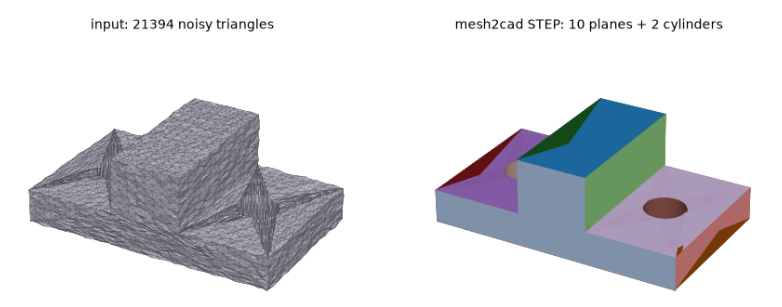
If it looks like an object that could have been made in OpenSCAD, then Mesh2CAD can probably CAD-ify it.
Also has an MCP interface and CLI.
Section3D
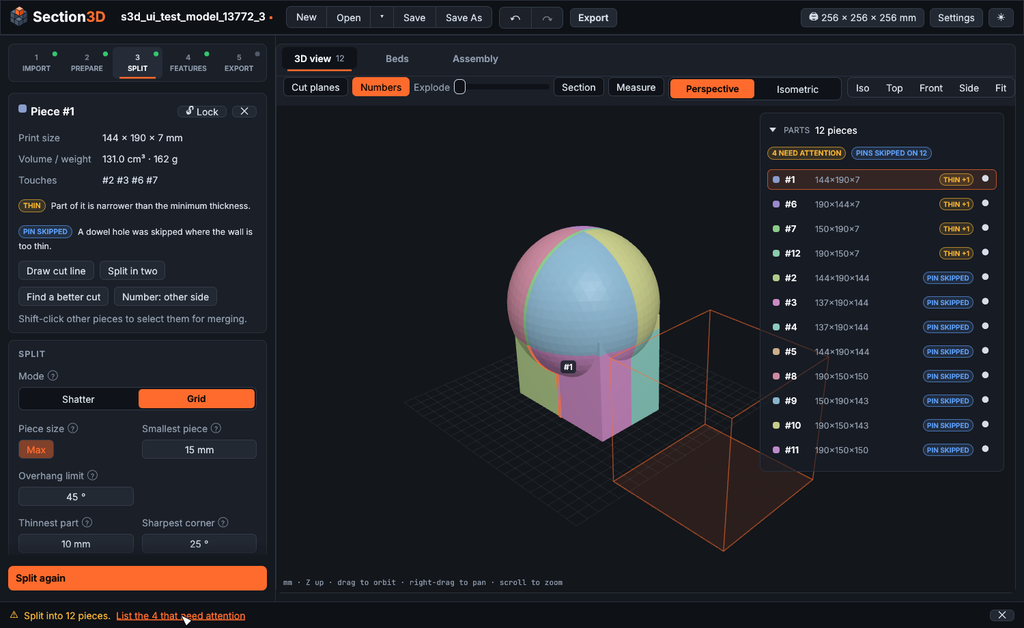
Doesn’t deal with 3D scans, but provides a way to intelligently “shatter” large 3D models (even and especially VERY LARGE models) into smaller, printable pieces that are easily assembled.
Standalone executable and worth at least a bookmark.